실시간 웹 푸쉬로 스마트한 운영 관리
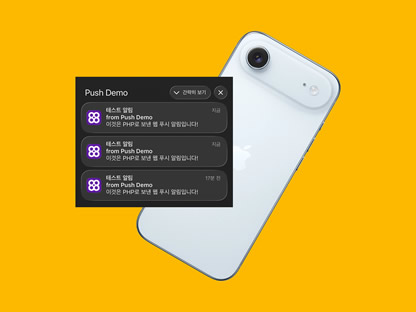
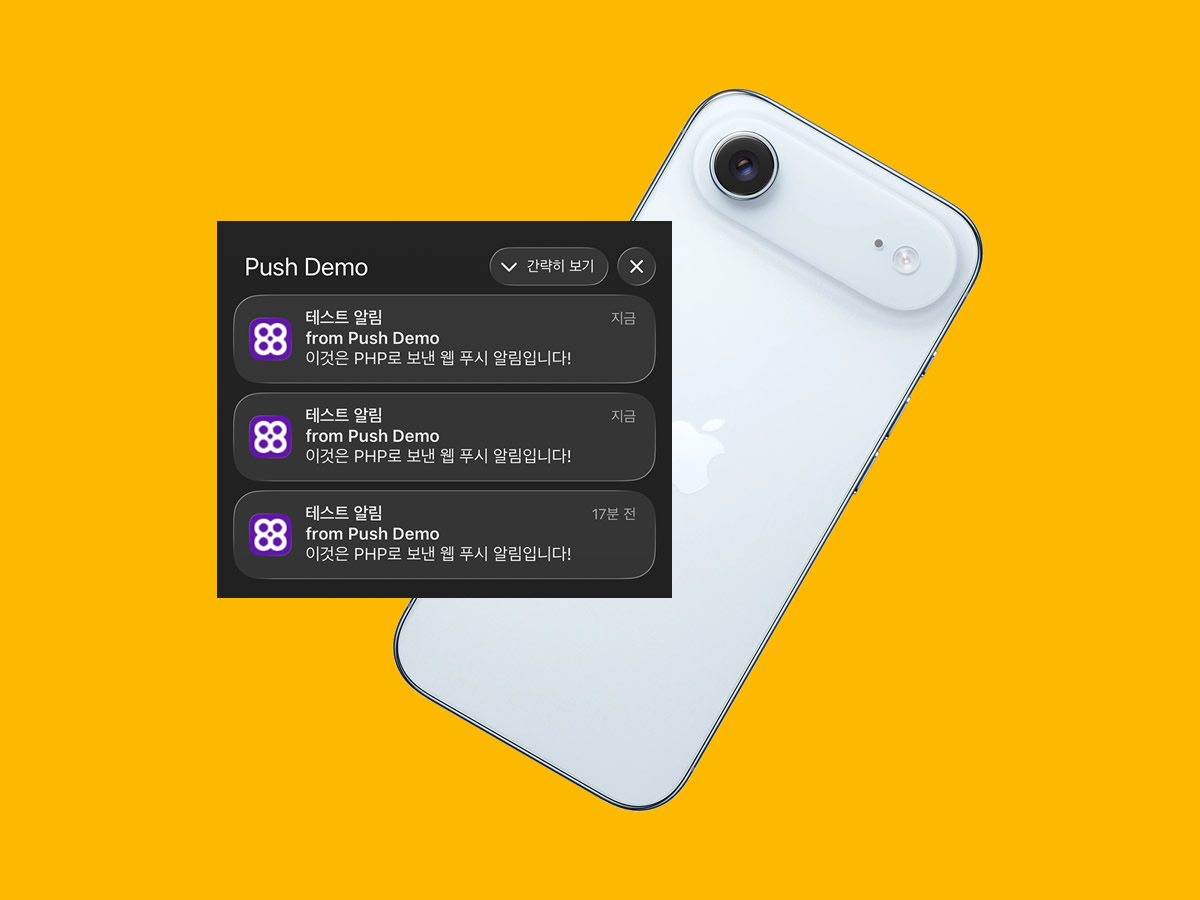
실시간 웹 푸시로 스마트한 운영 관리를 구현하려면, 안정적이고 효율적인 웹 푸시 기능을 구현해야 합니다. 운영 대시보드의 실시간 알림으로 더 빠르고 효율적인 운영 환경을 경험해 보세요.
이러한 대시보드의 웹 푸시 접근은 장비의 상태 모니터링과 화재접점 알림 그리고 배송 알림 등 구현 등과 같은 다양한 영역에 적용될 수 있습니다.
실시간 웹 푸시를 위한 PHP 외부 라이브러리 설치
PHP에서 웹 푸시 알림(Web Push Notification)을 제대로 구현하려면 대부분의 경우 외부 라이브러리를 사용해야 합니다. 가장 많이 쓰이는 라이브러리가 바로 minishlink/web-push 패키지입니다.
이 라이브러리를 사용하면 다음 작업을 쉽게 처리할 수 있습니다
- VAPID 키 생성 및 관리 (웹 푸시 인증에 필수)
- 브라우저별 Push API 지원 (Chrome, Firefox, Edge, Safari 등)
- 메시지 암호화 및 전송
- 에러 처리와 재시도 로직
이 모든 기능을 직접 코딩하려면 상당한 시간과 노력이 들고, 보안 이슈까지 발생할 수 있습니다. 하지만 Composer를 사용하여 minishlink/web-push 라이브러리를 설치하면 단 한 줄의 명령어로 최신 라이브러리를 설치 할 수 있습니다.
카페24 호스팅에서 Composer 설치
Composer는 PHP의 공식 의존성 관리자입니다. 주요 역할은 필요한 PHP 라이브러리를 자동으로 다운로드하고 설치해주며, 라이브러리 간의 의존성을 자동으로 관리합니다. 또한 프로젝트에서 사용하는 모든 패키지의 버전을 composer.json 파일 하나로 명확하게 관리하고, autoloader를 제공하여 클래스를 손쉽게 불러올 수 있게 해줍니다.
카페24 웹호스팅은 기본적으로 Composer가 설치되어 있지 않습니다. 하지만 직접 설치하면 PHP 패키지 매니저를 자유롭게 사용할 수 있게 됩니다. 이를 통해 최신 웹 푸시 라이브러리를 손쉽게 도입할 수 있고, Laravel Notification이나 데이터베이스 관리 라이브러리 등 다른 유용한 PHP 패키지도 바로 설치할 수 있습니다. 또한 코드 유지보수가 훨씬 수월해지고 개발 생산성이 크게 향상되는 장점이 있습니다.
실시간 웹 푸시 기능을 구현할 때 Composer가 필요한 이유는 minishlink/web-push 같은 전문 웹 푸시 라이브러리를 한 번의 명령어로 설치할 수 있기 때문입니다. Composer를 설치하려면 모든 디렉토리에서 php 명령어를 바로 사용할 수 있도록 설정해야 합니다. FTP로 접속한 후 .bash_profile 파일에 PATH 설정을 추가하면 php 명령어를 간편하게 사용할 수 있습니다.
# .bash_profile

# Set normal user account home directory for chroot
HOME="/$LOGNAME"
HISTFILE="$HOME/.bash_history"
colors="$HOME/.dircolors"

# Get the aliases and functions
if [ -f /etc/userbashrc ]; then
    . /etc/userbashrc
fi

# User specific environment and startup programs
PATH=$PATH:$HOME/bin:/usr/local/php82/bin
export PATH

LANG=ko_KR.UTF-8
export LANG

unset USERNAME

cd
PHP 버전에 따라 설치 경로가 다를 수 있으므로, 먼저 아래 명령어를 통해 정확한 PHP 경로를 확인해야 합니다.
// phpinfo.php

phpinfo();
PHP PATH 설정을 완료한 후, 아래 명령어를 순서대로 실행하면 Composer 설치가 완료됩니다.
# 루트 디렉토리로 이동
cd www

# Composer 설치 스크립트 다운로드
curl -o composer-setup.php https://getcomposer.org/installer

# Composer 설치
php -d allow_url_fopen=On composer-setup.php
web-push 라이브러리 설치 후 VAPID 키 생성하기
Composer 설치가 완료되었다면 아래 명령어를 순서대로 실행하세요. web-push 라이브러리를 설치하고, 웹 푸시에 필요한 Public Key와 Private Key(VAPID 키)를 생성할 수 있습니다. 생성된 키를 복사해서 사용하시면 됩니다.
# 웹 푸시 라이브러리 설치
php composer.phar require minishlink/web-push

# VAPID 키 생성 및 파일 저장
php -d "allow_url_fopen=On" -r '
    require "vendor/autoload.php";
    use Minishlink\WebPush\VAPID;
    $keys = VAPID::createVapidKeys();

    $content  = "=== VAPID Keys Generated at " . date("Y-m-d H:i:s") . " ===\n";
    $content .= "Public Key  : " . $keys["publicKey"] . "\n";
    $content .= "Private Key : " . $keys["privateKey"] . "\n";
    $content .= "=======================================\n\n";

    echo $content;
    file_put_contents("vapid_keys.txt", $content, FILE_APPEND);
    echo "VAPID 키가 vapid_keys.txt 파일에 저장되었습니다.\n";
'
web-push 파일 구조와 코드 구현
다음은 웹 푸시 기능을 구현하기 위한 전체 파일 구조와 실제 코드 예시입니다. 아래 예제를 기반으로 테스트를 진행한 후, 원하는 기능에 맞게 수정하거나 기능을 추가하면 됩니다.
아래 예제에서는 브라우저의 구독 정보를 subscriptions.json 파일에 저장하는 방식으로 구현했습니다. 다만 실제 서비스나 운영 환경에서는 파일 저장 방식 대신 데이터베이스(MySQL, MariaDB 등)를 사용하여 구독 정보를 관리해야 합니다.
/
├── index.php # 메인 웹 푸시 데모 화면
├── app.js # 클라이언트 측 구독, 알림 보내기 버튼 동작
├── service-worker.js # 푸시 알림 수신 및 클릭 처리
├── subscribe.php # 브라우저 구독 정보 저장
├── send.php # 알림을 푸시로 보내는 파일
├── manifest.json # PWA 홈 화면 추가 및 앱처럼 동작하게 설정
└── icons/ # PWA 및 알림에 사용될 아이콘 이미지 폴더
<!-- index.php -->
<!DOCTYPE html>
<html lang="ko">
<head>
<meta charset="UTF-8">
<meta name="viewport" content="width=device-width, initial-scale=1">
<title>Web Push 알림 데모</title>
<!-- PWA 메타 태그 -->
<meta name="mobile-web-app-capable" content="yes">
<meta name="apple-mobile-web-app-capable" content="yes">
<meta name="apple-mobile-web-app-status-bar-style" content="default">
<meta name="theme-color" content="#0d6efd">
<!-- Manifest -->
<link rel="manifest" href="/manifest.json">
<!-- 아이콘 -->
<link rel="apple-touch-icon" sizes="180x180" href="/icons/icon-180.png">
<link rel="icon" sizes="192x192" href="/icons/icon-192.png">
<link rel="icon" sizes="512x512" href="/icons/icon-512.png">
<link href="https://cdn.jsdelivr.net/npm/bootstrap@5.3.3/dist/css/bootstrap.min.css" rel="stylesheet">
<script src="https://cdn.jsdelivr.net/npm/bootstrap@5.3.3/dist/js/bootstrap.bundle.min.js"></script>
<link href="https://cdn.jsdelivr.net/npm/bootstrap-icons@1.11.3/font/bootstrap-icons.css" rel="stylesheet">
</head>
<body class="bg-light">
<div class="container py-5">
<div class="row justify-content-center">
<div class="col-md-8">
<div class="card shadow">
<div class="card-header bg-primary text-white d-flex justify-content-between align-items-center">
<h3 class="mb-0">🔔 Web Push Notification 데모</h3>
<button id="refreshBtn" class="btn btn-outline-light btn-sm">
<i class="bi bi-arrow-repeat"></i> 새로고침
</button>
</div>
<div class="card-body">
<p class="lead">알림 권한을 허용하고 테스트해보세요.<br>
<small class="text-muted">※ 아이폰은 반드시 홈 화면에 추가 후 사용해야 합니다.</small>
</p>
<button id="subscribeBtn" class="btn btn-success btn-lg w-100 mb-3">
알림 받기 시작하기
</button>
<div id="status" class="alert d-none"></div>
<hr>
<h5>테스트 알림 보내기</h5>
<div class="input-group mb-3">
<input type="text" id="title" class="form-control" placeholder="알림 제목" value="테스트 알림">
</div>
<div class="input-group mb-3">
<input type="text" id="body" class="form-control" placeholder="알림 내용" value="이것은 PHP로 보낸 웹 푸시 알림입니다!">
</div>
<button id="sendBtn" class="btn btn-primary w-100 mb-3">지금 알림 보내기</button>
<button id="refreshPageBtn" class="btn btn-secondary w-100">
페이지 전체 새로고침
</button>
</div>
</div>
</div>
</div>
</div>
<!-- 외부 JavaScript 파일 연결 -->
<script src="app.js"></script>
</body>
</html>// app.js
const publicVapidKey = '' //공개 키;
async function subscribeUser() {
if (!('serviceWorker' in navigator) || !('PushManager' in window)) {
alert('이 브라우저는 Web Push를 지원하지 않습니다.');
return;
}
try {
const sw = await navigator.serviceWorker.register('/service-worker.js');
// 이미 구독되어 있는지 확인
const existingSubscription = await sw.pushManager.getSubscription();
if (existingSubscription) {
showStatus('✅ 이미 알림이 등록되어 있습니다.', 'success');
return;
}
const subscription = await sw.pushManager.subscribe({
userVisibleOnly: true,
applicationServerKey: urlBase64ToUint8Array(publicVapidKey)
});
const response = await fetch('subscribe.php', {
method: 'POST',
body: JSON.stringify(subscription),
headers: { 'Content-Type': 'application/json' }
});
const result = await response.json();
console.log('구독 저장 결과:', result);
showStatus('✅ 알림 구독이 완료되었습니다!', 'success');
} catch (error) {
console.error('구독 오류:', error);
showStatus('❌ 구독 실패: ' + error.message, 'danger');
}
}
function showStatus(message, type = 'info') {
const status = document.getElementById('status');
status.classList.remove('d-none', 'alert-success', 'alert-danger', 'alert-info');
status.classList.add(`alert-${type}`);
status.innerHTML = message;
}
function urlBase64ToUint8Array(base64String) {
const padding = '='.repeat((4 - base64String.length % 4) % 4);
const base64 = (base64String + padding).replace(/-/g, '+').replace(/_/g, '/');
const rawData = window.atob(base64);
const outputArray = new Uint8Array(rawData.length);
for (let i = 0; i < rawData.length; ++i) {
outputArray[i] = rawData.charCodeAt(i);
}
return outputArray;
}
// ==================== 이벤트 연결 ====================
document.addEventListener('DOMContentLoaded', () => {
document.getElementById('subscribeBtn').addEventListener('click', subscribeUser);
document.getElementById('sendBtn').addEventListener('click', async () => {
const title = document.getElementById('title').value;
const body = document.getElementById('body').value;
try {
await fetch('send.php', {
method: 'POST',
headers: { 'Content-Type': 'application/json' },
body: JSON.stringify({ title, body })
});
alert('알림 전송 요청을 보냈습니다!');
} catch (e) {
alert('전송 요청 실패');
}
});
document.getElementById('refreshBtn').addEventListener('click', () => {
if (confirm('구독 상태를 초기화하고 새로고침하시겠습니까?')) {
navigator.serviceWorker.getRegistrations().then(regs => {
regs.forEach(reg => reg.unregister());
});
location.reload();
}
});
document.getElementById('refreshPageBtn').addEventListener('click', () => location.reload());
});// service-worker.js
self.addEventListener('push', function(event) {
let data = {};
try {
data = event.data.json();
} catch (e) {
data = { title: '알림', body: '새로운 알림이 있습니다.' };
}
const options = {
body: data.body || '내용 없음',
icon: '/icons/icon-192.png',
badge: '/icons/icon-192.png',
vibrate: [200, 100, 200],
data: {
url: data.url || '/index.php'
}
};
// iOS에서 필수: waitUntil 사용
event.waitUntil(
self.registration.showNotification(data.title || 'Web Push 알림', options)
);
});
self.addEventListener('notificationclick', function(event) {
event.notification.close();
event.waitUntil(
clients.openWindow(event.notification.data.url)
);
});// subscribe.php
header('Content-Type: application/json');
// 입력받은 구독 정보
$input = file_get_contents('php:\/\/input');
$newSubscription = json_decode($input, true);
if (!$newSubscription || !isset($newSubscription['endpoint'])) {
echo json_encode(['status' => 'error', 'message' => '잘못된 구독 정보']);
exit;
}
// 기존 구독 목록 불러오기
$subscriptions = [];
if (file_exists('subscriptions.json')) {
$json = file_get_contents('subscriptions.json');
$subscriptions = json_decode($json, true) ?? [];
}
// 중복 구독 체크 (같은 endpoint가 이미 있으면 업데이트)
$found = false;
foreach ($subscriptions as $key => $sub) {
if ($sub['endpoint'] === $newSubscription['endpoint']) {
$subscriptions[$key] = $newSubscription; // 기존 정보 업데이트
$found = true;
break;
}
}
// 새 구독이면 추가
if (!$found) {
$subscriptions[] = $newSubscription;
}
// 파일에 저장
file_put_contents('subscriptions.json', json_encode($subscriptions, JSON_PRETTY_PRINT | JSON_UNESCAPED_UNICODE));
echo json_encode([
'status' => 'success',
'message' => '구독이 저장되었습니다.',
'total' => count($subscriptions)
]);// send.php
require __DIR__ . '/app/vendor/autoload.php';
use Minishlink\WebPush\WebPush;
use Minishlink\WebPush\Subscription;
// POST 데이터 안전하게 받기
$input = file_get_contents('php://input');
$payload = json_decode($input, true);
$title = $payload['title'] ?? '테스트 알림';
$body = $payload['body'] ?? '새로운 알림이 도착했습니다!';
// VAPID 설정
$auth = [
'VAPID' => [
'subject' => 'mailto:your@email.com',
'publicKey' => '',
'privateKey' => ''
]
];
$webPush = new WebPush($auth);
// 구독 정보 불러오기
$subscriptions = json_decode(file_get_contents('subscriptions.json'), true) ?? [];
$successCount = 0;
foreach ($subscriptions as $sub) {
$subscription = Subscription::create($sub);
$report = $webPush->sendOneNotification(
$subscription,
json_encode([
'title' => $title,
'body' => $body,
'url' => 'https://yourdomain.com/index.php'
]),
['TTL' => 2419200]
);
if ($report->isSuccess()) {
$successCount++;
}
}
echo json_encode([
'status' => 'sent',
'total' => count($subscriptions),
'success' => $successCount
]);// manifest.json
{
"name": "Web Push 알림 데모",
"short_name": "Push Demo",
"description": "Web Push Notification 테스트 페이지",
"start_url": "/index.php",
"scope": "/",
"display": "standalone",
"background_color": "#ffffff",
"theme_color": "#0d6efd",
"orientation": "any",
"icons": [
{
"src": "/icons/icon-192.png",
"sizes": "192x192",
"type": "image/png",
"purpose": "any"
},
{
"src": "/icons/icon-512.png",
"sizes": "512x512",
"type": "image/png",
"purpose": "any"
},
{
"src": "/icons/icon-180.png",
"sizes": "180x180",
"type": "image/png"
}
]
}